How to block SiteGround WordPress automatic updates Yootheme Pro, Virtuemart and VMuikit: integration via dynamic fields for Joomla ecommerce Expert YOOtheme web designer and developer for Joomla and WordPress Hugo, HugoPlate, Netlify and GitHub expert for static websites AI Interface for a Tourist Tour with Internal Knowledge Base GPX files with and without timestamps: differences and how to record them correctly Experienced PrestaShop developer for professional ecommerce websites Security problems and hacks in Joomla 3 Errors sending emails with PHPMailer in Joomla 3 Joomla 3 incompatibility with PHP and MySQL Broken or unresponsive templates in Joomla 3 Errors with ACL and user permissions in Joomla 3 Email sending or SMTP errors in WordPress Slow speed and performance issues in WordPress Problems with TinyMCE editor in Joomla 3 How to block SiteGround WordPress automatic updates Yootheme Pro, Virtuemart and VMuikit: integration via dynamic fields for Joomla ecommerce Expert YOOtheme web designer and developer for Joomla and WordPress Hugo, HugoPlate, Netlify and GitHub expert for static websites AI Interface for a Tourist Tour with Internal Knowledge Base GPX files with and without timestamps: differences and how to record them correctly Experienced PrestaShop developer for professional ecommerce websites Security problems and hacks in Joomla 3 Errors sending emails with PHPMailer in Joomla 3 Joomla 3 incompatibility with PHP and MySQL Broken or unresponsive templates in Joomla 3 Errors with ACL and user permissions in Joomla 3 Email sending or SMTP errors in WordPress Slow speed and performance issues in WordPress Problems with TinyMCE editor in Joomla 3
How to block SiteGround WordPress automatic updates

How to block SiteGround WordPress automatic updates

Author Graziano De Maio - Gdmtech
I wish you a good read and remember: if after reading this article you need help, don't hesitate to contact me.
Author: Graziano De Maio | Founder of Gdmtech
Table of contents

I migrated a large WordPress site to SiteGround using a manual installation, without using SiteGround’s guided setup and WordPress management system.

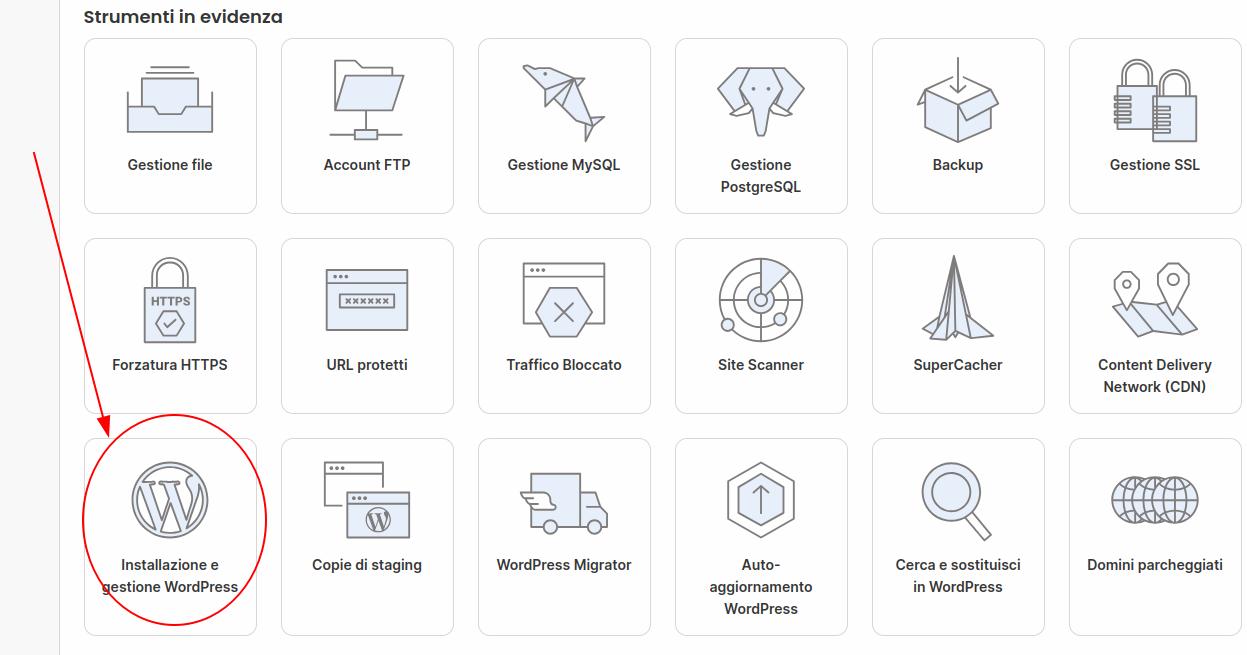
Later, in order to use the staging area and run some tests, I had to add the site to SiteGround’s WordPress management. The process was simple and only took a few clicks.

From that moment on, however, SiteGround also started to automatically manage core and plugin updates. In my case, since the site was highly customized, that was a problem.

While reading SiteGround’s documentation, I found a clear statement saying that it was possible to remove the project from WordPress management without deleting anything, by selecting the option to keep the database. In practice, though, that is not what happened: both the database and the files were deleted, and the site went down completely.

Fortunately, I was able to restore everything from a backup through the SiteGround interface. After this experience, I avoided adding WordPress back into SiteGround’s “WordPress management.” This means giving up the staging feature, at least for now, but I would rather find an alternative.

So, if you are looking for a way to prevent SiteGround from automatically updating WordPress, be careful: even adding the related string to the wp-config file, “disable-update true”, might not be enough, because SiteGround’s management system may still override it.

Author Graziano De Maio - Gdmtech
I wish you a good read and remember: if after reading this article you need help, don't hesitate to contact me.
Author: Graziano De Maio | Founder of Gdmtech
Graziano De Maio, Webdeveloper, SEO specialist
Graziano De Maio
Web Developer, SEO Specialist
Gdmtech Web Agency
Via Stefanardo da Vimercate 28 - (Milan)
Via Spinedi 55 - Postalesio (Sondrio)
Info & Contacts