GPX files with and without timestamps: differences and how to record them correctly

- Web developing
- December 1, 2025
Table of contents
GPX files (GPS Exchange Format) are used to store GPS routes such as tracks, waypoints and routes. However, not all GPX files are the same: some include temporal information (timestamps), while others do not.
This difference is crucial if you want to analyze speed, travel time or sync activities with apps like Strava, Komoot, or Garmin Connect.
Need help with a Joomla website? Get Joomla website support.

If you want to view a real animation of two GPX files using Segment Battle, it’s important that the files contain timestamp values.
Segment Battle is an online web application that allows you to upload two GPS tracks, choose a starting point, and run a side-by-side animation of both performances.
It’s ideal for virtual challenges on MTB segments (uphill or downhill), ski descents, running and trail running, product testing, and training comparison.
Differences between GPX with and without timestamps
| GPX type | Contains timestamps | Main use |
|---|---|---|
| GPX with timestamp | ✅ Yes | Speed analysis, timing, and fitness-app synchronization |
| GPX without timestamp | ❌ No | Route visualization, static maps, offline navigation |
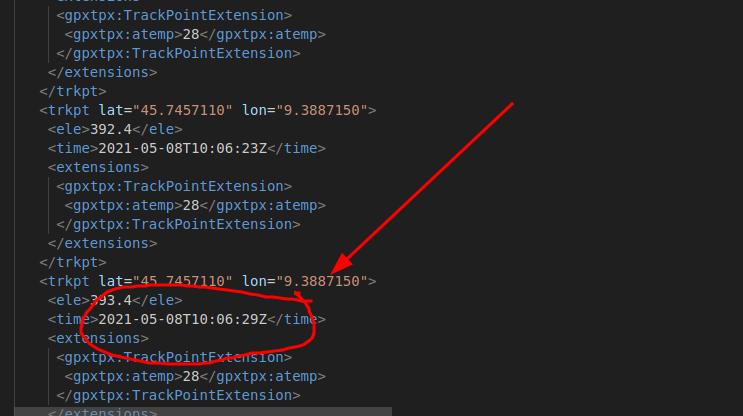
A timestamp is a value that indicates the exact time associated with each track point (<trkpt>).
Example of a GPX with timestamp:
<trkpt lat="46.169" lon="9.871">
  <ele>1210.5</ele>
  <time>2025-03-10T09:30:12Z</time>
</trkpt>
Example of a GPX without timestamp:
<trkpt lat="46.169" lon="9.871">
  <ele>1210.5</ele>
</trkpt>
Without the <time> tag, applications cannot calculate speed, time or performance data—they can only display the geometric route.
How to check whether a GPX file contains timestamps
You can easily verify this by opening the GPX file in a text editor and searching for the tag <time>.
If it appears at least once, the file contains temporal data.
Alternatively, you can use online tools such as:
- gpx.studio → displays the track and indicates whether time data is included
- GPS Visualizer → analyzes structure and timestamp fields
- GIS software like QGIS or desktop apps like Garmin BaseCamp
How to record a GPX file with timestamps
To generate a complete GPX file (with real timing and distance), you must record activity using devices or apps that store chronological data.
Here are some practical examples:
Garmin
- Use a Garmin device with an Activity mode (e.g., “Run”, “Cycling”).
- At the end of the activity, export the GPX file from Garmin Connect.
- Every point will automatically include a
<time>field.
Strava
- Record your activity using the mobile app or a paired device.
- Exporting a GPX from Strava always includes timestamps.
- However, if you export a planned route, Strava generates a GPX without timestamps (navigation only).
Komoot, Wikiloc, etc.
- Live recording (tracking on) → GPX with timestamps
- Exporting a planned route → GPX without timestamps
When to use GPX with or without timestamps
- With timestamps: training, performance analysis, fitness-app synchronization
- Without timestamps: static maps, trail references, navigation routes
👉 Pro tip: if you’re building a sports or performance archive, always ensure your GPX files include the <time> tag.
Conclusion
The timestamp in a GPX file represents the time dimension of a route. Without it, the track shows only the geographical path, but not the time taken to complete it.
Understanding how to identify and generate GPX files correctly allows you to obtain precise data and make the most of apps like Strava, Garmin and Komoot.
Quick summary:
A GPX file with timestamps contains recording times and enables detailed speed and performance analysis.
A GPX file without timestamps only describes the route geometry—useful for navigation, but not suitable for activity tracking.